

Go to New Games



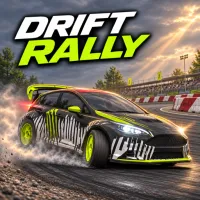
Drift Rally
Advertisement






















Drift Rally opens up an ultimate 3D off-road racing arena. This is where outstanding drivers face the challenge of passing through checkpoints before time runs out. The game is a test of vehicle control across many complex surfaces. Such as gravel, asphalt, and mud. Each time you pass through a checkpoint, bonus time is added. But the challenge will gradually increase as the amount of added time decreases after each stage. Maintain a high driving speed and perform controlled drifts.
GAMEPLAY GUIDE
In this game, players need to control the vehicle using the left and right arrow keys or the A and D keys. The A/left key is to steer the car left, and the D/right key is to steer right. The down arrow key, or S key, acts as the foot brake. At the same time, holding this key down when the car comes to a complete stop will help the car reverse in emergency situations. The spacebar is the most important tool to activate the handbrake. This key creates tire-burning drifts when entering corners at high speeds. If players activate manual throttle mode, the up key or W key will be used to accelerate. Additionally, the C key allows players to flexibly switch. The Esc or P key is used to pause the game. Players can also use the mouse to navigate menus or click directly on the icons on the screen.
Game modes
Drift Rally provides two main modes: Survival and Challenge. Survival mode puts players into an endless race across five different locations. Meanwhile, Challenge mode includes 60 separate stages with specific goals for time and drift points.
Multiple terrain surfaces
This game simulates in extreme detail the differences between terrain surfaces. Such as gravel, mud, and asphalt. These factors directly affect tire grip. Players will clearly feel the slipperiness when rushing into mud puddles or the stability when driving on asphalt roads.
Car customization and upgrades
Players have the opportunity to own ten rally racing car models ranging from basic to high-end. Furthermore, you can invest prize money into four main upgrade categories. Including Turbo, Brakes, Exhaust, and Suspension. In particular, anti-roll bar stiffness or ride height allows master players to personalize their gaming experience.
Game controls
Steering & speed:
- Steer using A/D or left/right arrows.
- Accelerate with the W / up arrow (if the manual throttle is active).
- Brake with S / down arrow (hold to reverse).
- Pull the spacebar for the handbrake.
Interface & view:
- Switch camera angles with C.
- Pause the action using Esc or P.
- Use the Mouse for menu navigation and on-screen brake buttons.
Expert advice
- Maintain a high speed when approaching checkpoints, as the added time will gradually decrease in later laps.
- Make full use of the handbrake on sharp corners to maintain the drift score bar.
- Prioritize upgrading the Turbo and Suspension systems first so the car has better acceleration and road grip.
- Observe your own ghost car to learn from mistakes and find the most optimal racing line.
- Adjust the stiffness of the suspension system in the car setup section to suit each type of road surface.